ALL IN ONE WEBSITE !!

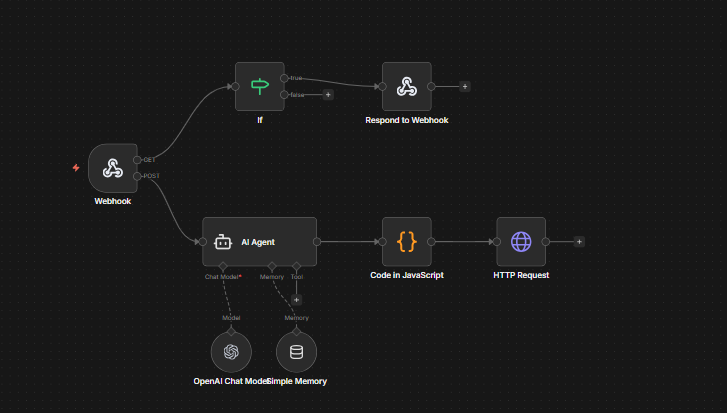
Messenger Bot Workflow
Webhook-Triggered AI Agent Workflow with Memory
Click on the Image to Download the Template FOR FREE !! 👇👇
Overview
This n8n workflow implements an AI-powered automation system triggered by webhooks. It features an AI Agent with persistent memory capabilities that can process requests and make HTTP calls. The workflow demonstrates a sophisticated integration pattern combining webhooks, AI processing, code execution, and external API communication.
Webhook Trigger
↓
If Condition Check
↙ ↓ ↘
AI Agent Processing
↓
Code in JavaScript
↓
HTTP Request
Workflow Components
TRIGGER
1. Webhook
Purpose: Acts as the entry point for the workflow, listening for incoming HTTP requests.
Functionality:
Receives external data via HTTP POST/GET requests
Triggers the workflow execution when called
Passes incoming data to subsequent nodes
Can accept JSON payloads, form data, or query parameters
Common Use: Integration with external applications, API endpoints, or third-party services that need to initiate automated processes.
LOGIC
2. If (Conditional Logic)
Purpose: Routes the workflow based on specific conditions or criteria.
Functionality:
Evaluates incoming data against defined conditions
Splits the workflow into multiple branches (true/false paths)
Allows for complex logical operations (AND, OR, comparison operators)
Can check for data presence, values, types, or patterns
Example Conditions:
Check if a specific field exists in the webhook payload
Validate data against expected values
Route based on request type or source
AI
3. AI Agent
Purpose: Processes requests using artificial intelligence with conversation memory.
Functionality:
Integrates with AI models (OpenAI, Anthropic, etc.)
Processes natural language inputs
Maintains conversation context across requests
Can perform tasks like text generation, analysis, or decision-making
Memory Components:
OpenAI Chat Model: The AI engine that processes requests
Window Memory: Stores conversation history for context-aware responses
PROCESSING
4. Code in JavaScript
Purpose: Executes custom JavaScript code for data transformation and processing.
Functionality:
Transforms data between nodes
Performs complex calculations or logic
Formats data for API requests
Implements custom business logic
Access to full JavaScript capabilities and n8n helper functions
Common Operations:
Parse and restructure JSON data
Generate dynamic values
Filter or aggregate data
Create custom error handling
ACTION
5. HTTP Request
Purpose: Makes outbound HTTP requests to external APIs or services.
Functionality:
Sends data to external endpoints
Supports all HTTP methods (GET, POST, PUT, DELETE, etc.)
Handles authentication (API keys, OAuth, Basic Auth)
Processes responses and errors
Can include custom headers and body data
Use Cases:
Interact with REST APIs
Send notifications or webhooks
Retrieve external data
Update third-party systems
RESPONSE
6. Respond to Webhook
Purpose: Sends a response back to the webhook caller.
Functionality:
Returns data to the original webhook request
Sets HTTP status codes
Customizes response format (JSON, text, HTML)
Provides feedback on workflow execution
Workflow Execution Flow
Step-by-Step Process:
Webhook Receives Request: An external system sends an HTTP request to the webhook URL, initiating the workflow.
Conditional Evaluation: The If node checks the incoming data against predefined conditions to determine the execution path.
AI Processing: The AI Agent analyzes the request using its language model, accessing conversation memory to maintain context and provide intelligent responses.
Data Transformation: The JavaScript code node processes and formats the AI output, preparing it for the next step.
External Communication: The HTTP Request node sends the processed data to an external API or service.
Response Delivery: The Respond to Webhook node sends the final result back to the original caller.
💡 Example Use Cases
Customer Support Automation: Receive customer queries via webhook, process them with AI, and respond with intelligent answers while maintaining conversation context.
Intelligent API Gateway: Route requests through AI analysis to determine appropriate actions or API endpoints.
Content Processing Pipeline: Accept content submissions, analyze them with AI, transform the results, and send to a content management system.
Chatbot Integration: Connect chat platforms to AI capabilities with persistent memory for natural conversations.
✓ Best Practices
Implement proper error handling in each node to catch failures gracefully
Use the If node to validate incoming data before processing
Configure appropriate memory window sizes for the AI Agent to balance context and performance
Secure your webhook with authentication to prevent unauthorized access
Monitor workflow execution and set up logging for debugging
Test the workflow thoroughly with various input scenarios
Key Features
Event-Driven Architecture: Responds to external triggers in real-time
AI-Powered Intelligence: Leverages advanced language models for processing
Conversation Memory: Maintains context across multiple interactions
Flexible Processing: Custom JavaScript execution for any transformation needed
External Integration: Seamless communication with external services
Conditional Logic: Smart routing based on data evaluation
Technical Considerations
Performance:
AI Agent processing time varies based on model and request complexity
Memory storage impacts response time but improves context accuracy
HTTP requests depend on external service response times
Security:
Webhook endpoints should use authentication
API credentials must be stored securely in n8n credentials
Validate and sanitize all incoming data
Use HTTPS for all external communications
Scalability:
Consider rate limits for AI API calls
Monitor memory usage for conversation history
Implement queuing for high-volume scenarios
Cache frequently used data where appropriate
Get the AI Agent Prompt 👉
let raw = $json.output;
// If the model wrapped the JSON in quotes, parse it safely
if (typeof raw === "string") {
try {
raw = JSON.parse(raw);
} catch (e) {
// If it fails, just clean it up manually
raw = { text: raw.replace(/(\n|")/g, '').trim() };
}
}
return [{ json: raw }];
JavaScript Code :